Meet Circe, my homemade server
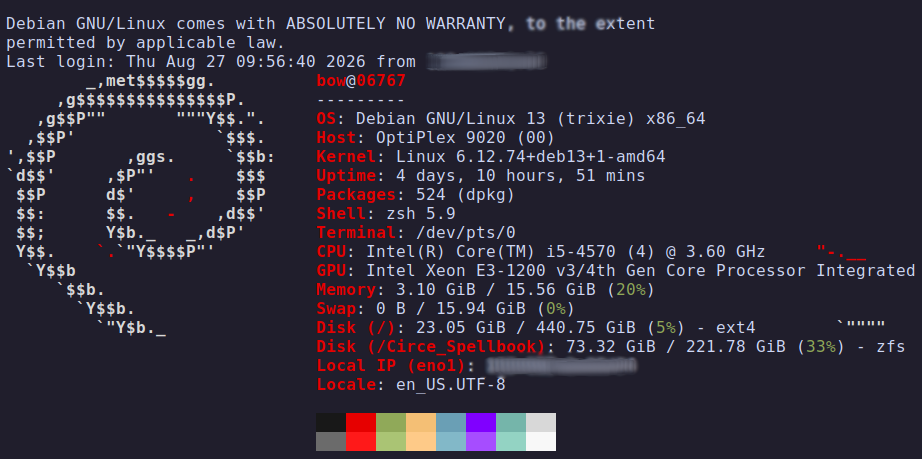
Executive Summary:
Designed and deployed a secure, self-hosted cloud infrastructure to host Nextcloud and Immich. Engineered with data resilience (ZFS RAID 1 + automated snapshots), Tailscale based private administrative access to reduce ssh exposure, and active threat defense (xCaddy + CrowdSec WAF/IPS) to mitigate automated exploitation and brute-force attacks.
All related files on my github : https://github.com/jems-cyber/server
Project Impact:
- Reduced Attack Surface: Eliminated public SSH exposure using Tailscale.
- Automated Threat Mitigation: Blocked Layer 7 attacks (XSS/SQLi) and brute-force attempts via CrowdSec.
Architecture design :
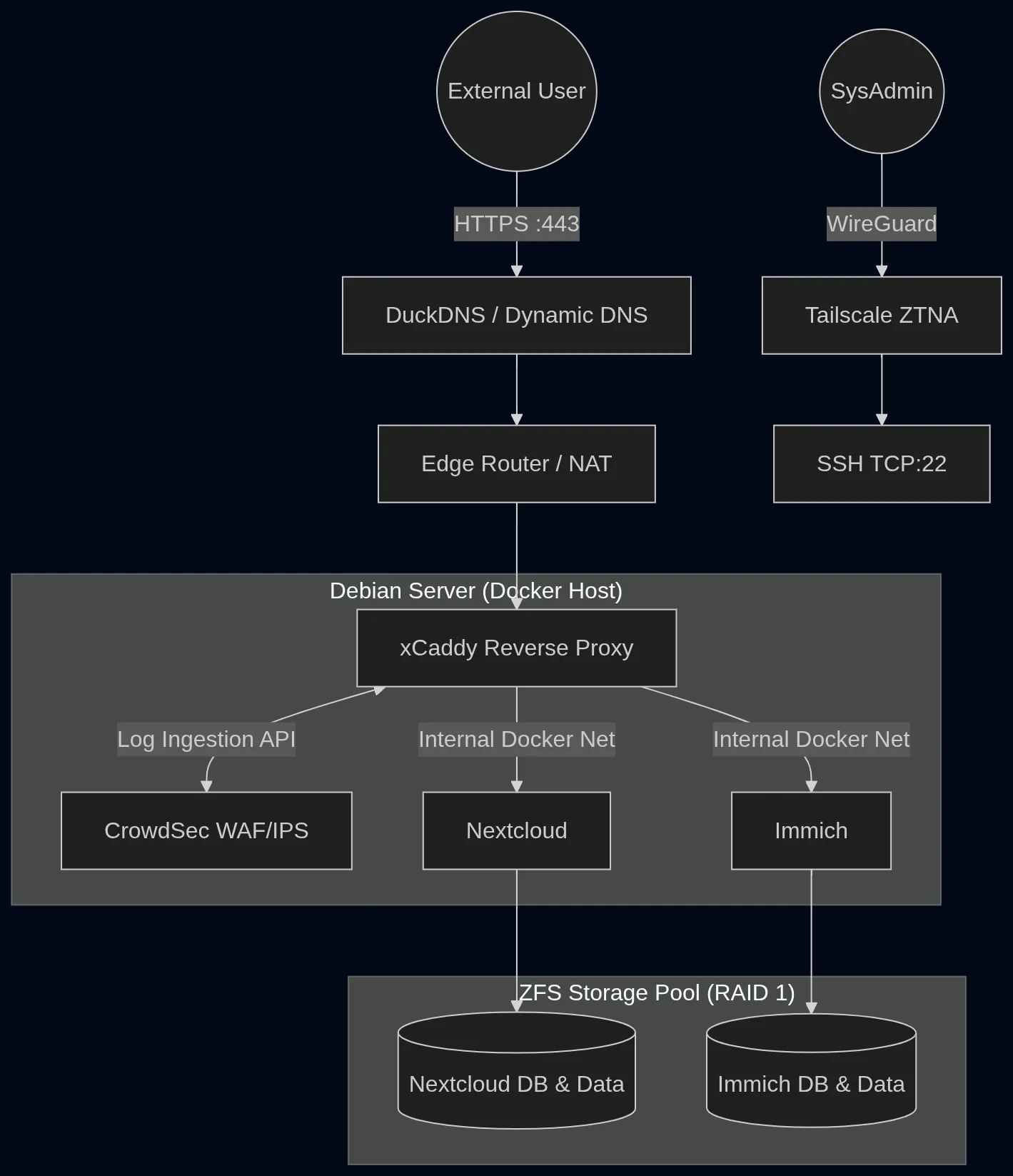
Service and port configuration
| Service | Internal Port | External Port | Exposure | Network Segregation |
|---|---|---|---|---|
| SSH | 22 | None | ZTNA (Tailscale) only | Host OS |
| xCaddy | 80/443 | 80/443 | Public Web | caddy_net_final |
| Nextcloud | 80 | None | Reverse Proxy only | caddy_net_final |
| Immich | 2283 | None | Reverse Proxy only | caddy_net_final |
Summary
- 1. Eliminating Public SSH with Tailscale
- 2. Configuration of a RAID 1 storage pool (ZFS)
- 3. Automating snapshots/backups (Sanoid)
- 4. Application Deployment
- 5. fixed local ip and domain names
- 6. Reverse proxy setup and custom binary (Caddy/xCaddy)
- 7. Edge Security & WAF (Crowdsec)
- 8. Attack Scenarios Results (Brute force, SQL injection)
- 9. If I had the funding/time
1. Eliminating Public SSH with Tailscale
Instead of exposing an open SSH port, I used Tailscale to facilitate Zero Trust Network Access (ZTNA) and reduce my external attack surface. I restrict this only to SSH since applying it to front end file retrieval would force client authentication on every personal device.
every obvious or well documented installation process such as tailscale or docker will be skipped.
2. Configuration of a RAID 1 storage pool (ZFS)
I chose ZFS because it replaces the traditional fdisk, mdadm, and mkfs.ext4 stack with a unified storage manager that actively prevents bit rot. I choose a RAID1 configuration for financial reasons.
after formatting the disks I noticed with lsblk, a “sdb2” (partition that hasn’t been erased) but ZFS will take care of erasing the partition when creating the pool. (it’s automatic)
problem encountered during installation :
I configured my Debian .sources file to only get free packages. But apparantly ZFS needs the “contrib non-free” tag even if ZFS is free.
Solution :
going back to our package .sources and adding “contrib non-free”
to create a pool, you can use the hard drives names your OS gives you (sda, sdb etc..) but if you interchange the drives, it wouldn’t work anymore in older disk mount tools, so just in case let’s do it with the specific disk ID.
# this is/was the unsafe way
zpool create -f tank mirror /dev/sdb /dev/sdc
the safe way :
find out each disk’s SERIAL number and match it with their ID
#to get disk ID
lsblk --nodeps -o name,serial
--nodeps (no dependencies) : only show the parent drives, no partitions-o name,serial only outputs the name and serial column of lsblk
i listed all disks ID and mount them using their ID
zpool create <name of your pool> mirror /dev/disk/by-id/ata-ST3250318AS_5VY5KNNV /dev/disk/by-id/ata-WDC_WD2500AAKX-603CA0_WD-WMAYV36570193. Automating snapshots/backups (Sanoid)
I choose Sanoid (snapshot management tool for zfs) over the included auto snapshots from zfs because of better customization options.
Security context : this offers a tight Recovery Point Objective (RPO) to instantly roll back in the event of ransomware or accidental data deletion.
Naming convention :snapshot_name@file_system_name
For example, the snapshot named “backup” of the filesystem “Downloads” would be named :
backup@Downloads
Classic template : (lives at /etc/sanoid/sanoid.conf )
[pool_name]
	use_template = daily_only
	recursive = yes

[name_of_template]
	daily = 30
	hourly = 0
	frequently = 0
	monthly = 0
	yearly = 0
	autosnap = yes
autoprune = yesautoprune: to delete the oldest snapshot when you reached the limit you’ve definedautosnap : to enable automatic snapshots
check if it’s working :
systemctl status sanoid.timer4. Application Deployment (Docker, Immich, Nextcloud)
a. DOCKER
I chose Docker instead of hosting services on bare-metal because of better threat isolation in case a service ever get compromised by a threat actor.
Future Improvement : Migrate to Rootless Docker to mitigate container breakout vulnerabilities.
b. IMMICH
Installation guide at https://docs.immich.app/overview/quick-start/
to check if it’s running :
curl -I http://localhost:2283Later on we will be working with Caddy (open source reverse proxy), and edit our yml file :
_ by adding a network for caddy (few lines at the end of file)
_ commenting out the port (so machines on local network can’t bypass Caddy)
As well as the .env :
_ by declaring caddy’s container ip subnets as trusted proxies to reveal uploader’s ip
c. NEXTCLOUD
While Nextcloud AIO is recommended for beginners, I opted for custom Docker Compose manifests to retain granular control
needed docs at https://github.com/nextcloud/docker/blob/master/.examples/docker-compose/insecure/mariadb/apache/compose.yaml
check if its is alive :
curl -I http://localhost:8080 # port in the ymlWe will modify the docker-compose.yml later on, this is just to ensure it works.
5. Network Infrastructure & Dynamic DNS Routing
To ensure consistent internal routing and reliable reverse proxy targeting, I configured a static DHCP reservation at the edge router level, binding the server’s MAC address to a permanent local IP. This guarantees the server survives reboots and network drops without breaking Caddy’s upstream proxy rules.
For external resolution, I implemented DuckDNS as a lightweight Dynamic DNS (DDNS) provider. I provisioned dedicated subdomains for each application.
6. Reverse proxy setup and custom binary (Caddy/xCaddy)
Caddy is an open source reverse proxy, it links your domain name with the server’s IP + port. there are other big names like NGINX but Caddy is easier because it renews SSL certificates on its own.
Problem : caddy doesn’t support Crowdsec
Solution : we will use xCaddy, (a tool that allows you to use caddy with custom modules, here with the crowdsec module)
We will first make a Dockerfile that will install xcaddy and its dependencies
#modified dockerfile from
#https://github.com/serfriz/caddy-custom-builds/blob/main/caddy-duckdns-crowdsec/Dockerfile

ARG CADDY_VERSION=2
#change this to the latest version

# removed "alpine" so it defaults to Debian
# (easier to debug because tools are pre-installed)
FROM caddy:${CADDY_VERSION}-builder AS builder

RUN xcaddy build \
    --with github.com/mholt/caddy-l4 \
    --with github.com/caddyserver/transform-encoder \
    --with github.com/hslatman/caddy-crowdsec-bouncer/http@main \
    --with github.com/hslatman/caddy-crowdsec-bouncer/appsec@main \
    --with github.com/hslatman/caddy-crowdsec-bouncer/layer4@main

FROM caddy:${CADDY_VERSION}

COPY --from=builder /usr/bin/caddy /usr/bin/caddy
then create a “shared Docker network”, basically services inside containers are meant to be isolated but i need them to exchange with caddy and later on with crowdsec, so we will create a “network” aka a link between the containers and caddy.
docker network create caddy_net_final
# you can name it as you wish
reconfigure the .yml files of our services to specify the network
#at the end of the docker-compose of each service, add :
networks:
 caddy_net_final:
  external: true
and spin up the containers.
Create a .docker-compose.yml file for both caddy and crowdsec in the same path where the Dockerfile is. I used :
docker-compose.yml
https://github.com/crowdsecurity/example-docker-compose/blob/main/caddy/docker-compose.yml
.env
just store the CROWDSEC_API_KEY variable.
Caddyfile
https://github.com/crowdsecurity/example-docker-compose/blob/main/caddy/Caddyfile
architecture tree :
_ Caddyfile
|_ Dockerfile
|_ .env
|_ docker-compose.yml
all in the same directory.
spin up the containers :
docker compose up -d --buildi used —build because it didn’t compile new changes if not.
1st Problem : Cross-stage build failures during xCaddy compilation.
Solution: Identified a naming mismatch between the custom CrowdSec and Hslatman repositories; resolved by standardizing the build stage alias in the Dockerfile
FROM caddy:${CADDY_VERSION} AS caddy2nd problem : The CrowdSec container entered a continuous restart loop. Log analysis (docker logs crowdsec) revealed a fatal initialization error: Docker had incorrectly mounted the acquis.yaml configuration path as a directory instead of a file.
Solution : I replaced the faulty directory with a validated configuration file from the CrowdSec bouncer repository. To ensure a clean state, I tore down the corrupted container (docker compose rm -s -f) and performed a fresh build (docker compose up -d --build)“
Log Analysis : Utilized jq for parsing Caddy’s JSON-formatted Docker logs to monitor WAF block events in real-time :
docker logs <name-of-container> 2>&1 | jq -R 'fromjson? // empty'check if caddy is working fine :
curl -I http://localhost
#notice it will not work with https as defined in the Caddyfile from crowdsec
# (its just a test)
# it will return HTTP/1.1 200 OK if it works
check if crowdsec is fine :
# block all ip (duration has to be >1min (caddy loads ban list every min))
 docker compose exec crowdsec cscli decisions add --range 0.0.0.0/0 --duration 15m

# instead of waiting 60s until it reloads the list let's force it
docker compose restart caddy

# now try to curl it (using ipv4)
curl -4 -I http://localhost

#now rollback
docker compose exec crowdsec cscli decisions delete --range 0.0.0.0/0
I configured my Caddyfile using (https://github.com/hslatman/caddy-crowdsec-bouncer/blob/main/examples/docker/caddy-conf/Caddyfile):
I uncomment all WAF related configuration to activate it and associated my services with their domain names
#proxies
<my_Nextcloud_domain_name> {
    import crowdsec_secured

    # Nextcloud requires these two redirects for Calendar and Contacts syncing to work
    redir /.well-known/carddav /remote.php/dav 301
    redir /.well-known/caldav /remote.php/dav 301

    reverse_proxy nextcloud:80
}

<my_Immich_domain_name> {
    import crowdsec_secured
    reverse_proxy immich-server:2283
}
also uncomment all WAF related lines in the acquis.yaml, (you can check my final version on GitHub) and install followings for WAF to work :
sudo docker compose exec crowdsec cscli collections install crowdsecurity/appsec-crs
sudo docker compose exec crowdsec  cscli collections install crowdsecurity/appsec-virtual-patching crowdsecurity/appsec-generic-rules
7. Edge Security & WAF (Crowdsec)
Crowdsec is both an Intrusion Prevention System and an Active Threat Response against brute force attempts. It also functions as a Web Application Firewall (WAF), providing protection against SQL Injection, Cross-Site Scripting, ssh brute forcing, etc…
first add the Nextcloud collections to Crowdsec :
change the crowdsec docker-compose file by adding this
    environment:
      - GID=1000
      - BOUNCER_KEY_CADDY=${CROWDSEC_API_KEY}
      - |   # this is a list and comments will not work inside so erase mine
        COLLECTIONS=
        crowdsecurity/caddy
        crowdsecurity/http-cve
        crowdsecurity/whitelist-good-actors
        crowdsecurity/nextcloud
        crowdsecurity/appsec-virtual-patching  #all following necessary for WAF
        crowdsecurity/appsec-generic-rules
        crowdsecurity/appsec-crs
then allow Crowdsec to read Nextcloud’s logs :
#in the same docker-compose
volumes:
      - crowdsec-db:/var/lib/crowdsec/data/
      - ./crowdsec/acquis.yaml:/etc/crowdsec/acquis.yaml
      - caddy-logs:/var/log/caddy:ro
      - nextcloud:/var/www/html:ro  # added this
security note :
To mitigate the risk of lateral movement and maintain audit trails, the Nextcloud and Caddy log volumes are mounted as read-only to CrowdSec. This configuration prevents unauthorized log modification or deletion should a threat actor gain access to the CrowdSec environment.
then indicate to crowdsec where it can read those logs by modifying the acquis.yaml file :
#just add the following
---
filenames:
 - /var/www/html/data/nextcloud.log
    labels:
     type: nextcloud
Problem: CrowdSec initialization failed due to an undefined Nextcloud volume reference (invalid compose project).
Solution: Identified a Docker Compose internal naming discrepancy. Corrected the external volume mapping in the CrowdSec configuration to target circe-nextcloud_nextcloud.
8. Attack Scenarios Results (Brute force, SQL injection)
We will test out different scenarios to check if our server is correctly secured against those attacks.
A. Brute force attack
A short really basic brute force bash code :
#!/usr/bin/env bash
URL="http://localhost"  #change to adapt
USER="user@gmail.com"
PASSWORDS=("pleeeaaasseee" "password" "immich" "admin" "12345678" "letmein" "test1234")

for pw in "${PASSWORDS[@]}"; do
  echo "Trying password: $pw"
  curl -s -o /dev/null -w "HTTP %{http_code}\n" \
    -X POST "$URL/api/auth/login" \
    -H "Content-Type: application/json" \
    --data "{\"email\":\"$USER\",\"password\":\"$pw\"}"
done
Once my laptop’s IP is blocked, we can read the details of the attack using :
docker exec crowdsec cscli alerts listwhich returns :
| ID | Source IP | Reason / Trigger | Country | ASN / Organization | Decision | Timestamp (UTC) | Kind |
|---|---|---|---|---|---|---|---|
| 1603 | 195.83.2.34 | LePresidente/http-generic-401-bf | FR | 2200 Renater | ban:1 | 2026-10-12 18:35:45 | crowdsec |
| 1598 | 193.32.162.164 | anomaly score out-of-band: lfi: 5, anomaly: 15 | RO | 47890 Unmanaged Ltd | 2026-10-12 09:44:51 | waf | |
| 1597 | 193.32.162.164 | crowdsecurity/vpatch-git-config | RO | 47890 Unmanaged Ltd | 2026-10-12 09:44:51 | waf | |
| 1588 | 144.172.98.192 | anomaly score out-of-band: lfi: 5, anomaly: 5 | US | 14956 ROUTERHOSTING | 2026-10-11 18:25:04 | waf | |
| 1587 | 144.172.98.192 | crowdsecurity/vpatch-git-config | US | 14956 ROUTERHOSTING | 2026-10-11 18:25:04 | waf |
the first ip is the latest (mine)
to get even more details we can inspect the specific alert ID generated from the previous command :
docker compose exec crowdsec cscli alerts inspect <ALERT_ID> which gives :
################################################################################

 - ID           : 1603
 - Date         : 2026-10-12T18:35:47Z
 - Machine      : localhost
 - Simulation   : false
 - Remediation  : true
 - Kind         : crowdsec
 - Reason       : LePresidente/http-generic-401-bf
 - Events Count : 6
 - Scope:Value  : Ip:195.83.2.34
 - Country      : FR
 - AS           : Renater
 - Begin        : 2026-10-12T18:35:45Z
 - End          : 2026-10-12T18:35:47Z
 - UUID         : 2fa70af7-3ee5-4a41-9d98-ea8eb7090610

+-----------------------------------------------------------------------+
| Active Decisions                                                      |
+---------+----------------+--------+------------+----------------------+
|    ID   |   scope:value  | action | expiration |      created_at      |
+---------+----------------+--------+------------+----------------------+
| 2080677 | Ip:195.83.2.34 | ban    | 3h58m9s    | 2026-10-12T18:35:47Z |
+---------+----------------+--------+------------+----------------------+

 - Context  :
+------------+-----------------+
|     Key    |      Value      |
+------------+-----------------+
| method     | POST            |
| status     | 401             |
| target_uri | /api/auth/login |
| user_agent | curl/8.5.0      |
+------------+-----------------+
Here, we clearly see that my laptop was banned, scenario worked flawlessly ;)
let’s not forget to unban ourselves :
docker exec crowdsec cscli decisions delete --ip <my_ip>B. WAF Simulation (SQL injection)
let’s try to execute a SQL injection attack from my laptop :
curl -I "https://<your_nextcloud_domain_name>/?id=1'%20OR%20'1'='1"

# which returns :
HTTP/2 200
alt-svc: h3=":443"; ma=2592000
cache-control: no-store
content-type: text/html; charset=utf-8
date: Mon, 12 Oct 2026 19:38:45 GMT
etag: "1af9-INIf8E+dRYlF4FEQYTZe6ehBkUM"
via: 1.1 Caddy
x-powered-by: Express
content-length: 6905
To check if it was correctly blocked :
# on the server
docker exec crowdsec cscli alerts list
which returns :
Recent Security Alerts
| ID | Value (IP) | Trigger / Reason | Country | ASN / Organization | Decision | Timestamp (UTC) | Kind |
|---|---|---|---|---|---|---|---|
| 1616 | 78.240.214.32 | anomaly score out-of-band: sql_injection: 10, anomaly: 10 | FR | 51207 Free Mobile SAS | 2026-10-13 16:24:07 | waf | |
| 1605 | 195.83.2.34 | anomaly score out-of-band: sql_injection: 10, anomaly: 10 | FR | 2200 Renater | 2026-10-12 19:38:45 | waf | |
| 1603 | 195.83.2.34 | LePresidente/http-generic-401-bf | FR | 2200 Renater | ban:1 | 2026-10-12 18:35:45 | crowdsec |
here, 1605 is the ID of our SQL attack.
As we can see the attack was detected and couldn’t do any damage as we are secured against sql injections. However it wasn’t banned to avoid false-positives.
9. Next Steps: If I Had More Time and Funding
With More Time
*Deploy a 2FA Portal (Authelia / Authentik) : To reduce unauthorized access risks.
Migrate from Tailscale to Headscale : Switch to a fully open-source, self-hosted control server for the mesh VPN to retain complete control over the network infrastructure.
*Fine-tune CrowdSec Scenarios : Write custom CrowdSec parsers and scenarios to actively detect and neutralize low-and-slow brute force attacks that bypass default thresholds.
With More Funding
L4 Load Balancing & DDoS Mitigation : Set up my own Load balancer system (layer 4 over 7 preferably ). A bit overkill for a home lab, but a setup I have wanted to build ever since reading into Cloudflare’s edge design.
Dedicated Compute/RAM for Local Threat Hunting LLMs : Add enough memory to run local LLMs dedicated to log analysis and threat detection. While traditional rule-based pattern matching (like CrowdSec) is more than enough today, running local models would be a great way to experiment with emerging workflows.